dbdspirit:

In response to the NSFW ban being enacted by Tumblr Staff, on December 17th 2018 I propose that we all log off of our Tumblr accounts for 24 hours. 


The lack of respect and communication between staff and users is stark. Users have been begging staff to delete the porn bot outbreak, which has plagued the website for well over a year. The porn bots oftentimes send people asks and messages, trying to get them to go to a website full of viruses. They also spam advertisements on others posts.  

Users have also begged that Tumblr ban neo-nazis, child porn, and pedophiles, all which run rampant on the site. The site/app got so bad that it was taken off the app store.

However, instead of answering the users, Tumblr has instead taken the liberty to ban all NSFW content, regardless of age. But users have already run into issues of their SFW content being marked as sensitive and being flagged as NSFW, not allowing them to share their work.

Not only does this discriminate again content creators, but it also discriminates against sex workers. Disgustingly, the ban will be enacted on December 17 which is also International Day to End Violence Against Sex Workers.

This ban is disgusting, and while I (and plenty of others) welcome porn bots and child porn being banned, the Tumblr filtration system is broken. It tags artistic work’s nipples as NSFW (when it is art), it tags SFW art as NSFW (when it is not), and does not stop the porn bots, neo-nazis and dozens of other issues.


This ban is discriminatory. This ban is ineffective. This ban is unacceptable. 


To protest, log off of your Tumblr account for the entirety of November 17th. Log off at 12 am EST or 9PM PST and stay off for 24 hours. Don’t post. Don’t log on. Don’t even visit the website. Don’t give them that sweet ad revenue. 

Tumblr’s stock has already taken a hard hit. Let’s make it tank. Maybe then they will listen to the users. 


Reblog to signal boost! We must force change.

How to Backup your Tumblr

thepirateking:

fiction-is-not-reality:

I was just semi-complaining that I was still looking for a decent way to backup my +6k posts without having to use paid services or even just wordpress (which has an import from tumblr tool that asks for permission to access your blog and also make posts), when I decided to actually put some effort into my google search. 

Results were positive: I have successfully backed up my blog

*By which I mean: everything that I have ever posted
Not included: drafts, queue, likes, followers, following, comments, notes, chat. 

I followed this method (word by word), and now have a 450 MB folder on my computer with the name of my blog on it containing: 

1. Folder “Archive” (contains .html files listed by month)
2. Folder “Media” (contains gifs and images, mine has +1k files in it; might contain also audios but I have no way of confirming that because I’ve never reblogged an audio post from this blog)
3. Folder “Posts” (contains single .html files, each one a post; I have +4k files in it)
4. Folder “Theme” (contains only my avatar, but it might be a matter of if you have personalized themes or not)
5. .html file “Index” (by opening it it will give you the archive of your blog organized by month; clicking on a month will open up the archive for that month, and you’ll be able to read all the posts for that month as if you were on your blog**, except sans your theme graphic, with each page containing 50 posts)

**I can see gifs, links, embedded videos, tags, number of notes (but I can’t open up the notes, clearly), text is also correctly formatted. 

So yeah, in case anyone wants a very quick way to back up their blog, it took me less than 10 minutes. 

P.S. I didn’t have any issue, but to be on the safe side always check for spyware and virus threats before and after downloading anything. 

this is actually really useful if you have an art blog full of years of work that you otherwise no longer have access to the original files. A lot of the art I have in the early days of my art blog are in that boat. I did this process JUST for that reason and I was pretty astonished at just how many pieces of media it backs up! (literally all of it) Drawings I didn’t even realize were sitting in my archive due to having been posted to text posts or undercuts, or untagged for years! It’s worth it if just for that, even if tumblr isn’t shutting down or deleting your blog.

stitchformers:

cablefucker69:

stitchformers:

A step by step guide on how I do that thing with the needle. 💘

instagram | website

If you like this method, please do check out the work of Harry Thomson, it is where I first saw this method and began to use it for my own stitch work. 

Lovely! So do you count threads of the fabric to keep your stitches so consistent? Is this on eavenweave or something else?

I definitely count the threads. Each stitch is nine holes long. This is just regular 100% cotton fabric. Evenweave would be too large and would create too many gaps. 

chuwenjie:

A compilation of stuff I know about drawing Asian faces and Asian culture! I feel like many “How-To-Draw” tutorials often default to European faces and are not really helpful when drawing people of other races. So I thought I’d put this together in case anyone is interested! Feel free to share this guide and shoot me questions if you have any! I’m by no means an expert, I just know a few things from drawing experience and from my own cultural background. 

ryugan777:

tf2humbug:

tomatomagica:

secretsivekept:

dragonofdarknesschaos:

lazysmirk:

Just in case you forget this exists.

It exists.

With those “when you want to design a character but you don’t know color theory” posts flying around I thought this would be relevant again.

SLAMs THE REBLOG BUTTON

there’s also Coolors website that gives you randomized palettes!

image

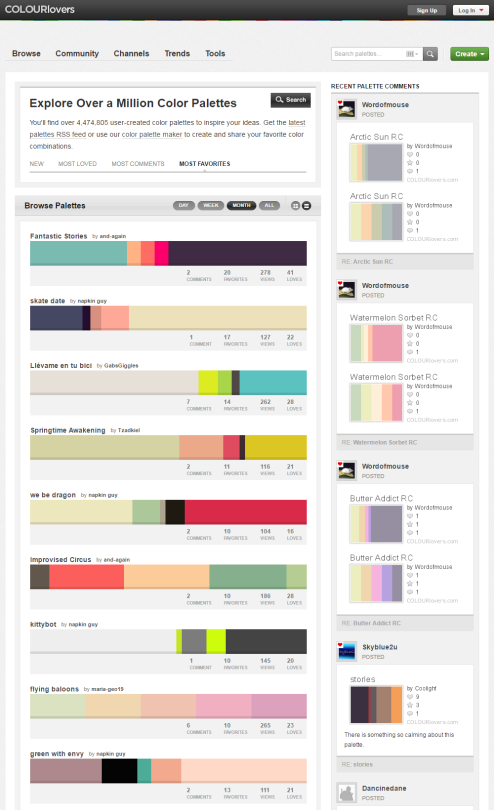
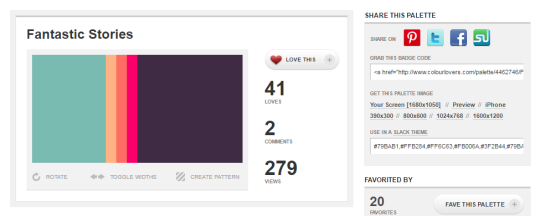
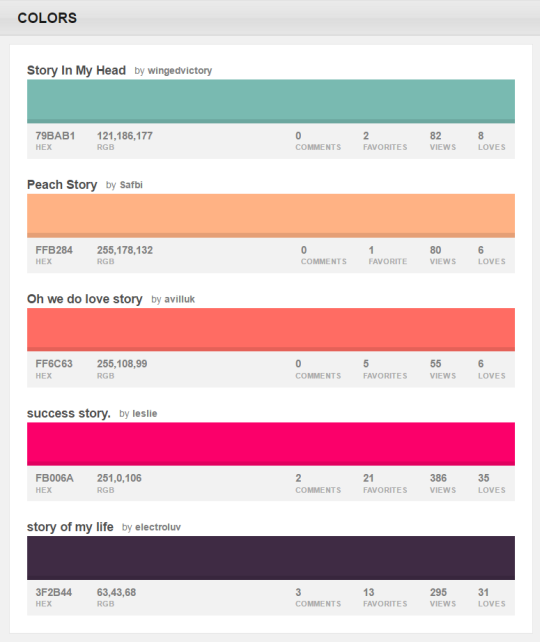
Don’t forget ColourLovers, either! It’s a social media-esque site where you can browse tons of palettes and share your own.

You can browse the most popular ones or search for certain colors, themes, and even specific hex codes!

When you find one you like, you can download a wallpaper swatch of it and also select the specific colors it uses to look at more palettes that use those same ones.

ColourLovers is my go-to for when I’m having trouble coming up with a color scheme! It’s also been around for over a decade, so there’s plenty to browse through.

Gotta keep that close